

This article highlights the most essential Xero reports that can help users improve their financial knowledge of their business and make well-informed decisions. Whether you’re managing day-to-day operations or planning for the future, these reports will provide the clarity you need to enhance your company’s strategic decisions based on timely financial insights.
What are Xero reports?
Xero Reports are financial statements and summaries that offer insight into a company’s financial activities. These reports include but are not limited to the Balance Sheet, Profit and Loss Statement, Cash Flow Statement, Account Receivable Report, Account Transactions Report, and Bank Reconciliation Summary. Each report provides unique insights into specific areas of financial performance.
These reports enable users to track financial performance, identify trends, and make data-driven decisions. Whether it’s analyzing profitability, monitoring cash flow, or assessing the impact of business decisions, Xero Reports provide the necessary information for effective financial management.
Xero Reports can easily be generated from the Reports section under the Accounting Tab. By selecting the star sign, you can favorite a report.
Target Audience for Xero Reports
The target audience for Xero Reports is diverse and includes business owners, employees, accountants, and tax consultants. Business owners and employees can utilize Xero Reports to gain a clear understanding of their company’s financial performance, while accountants and finance professionals can leverage these reports to provide valuable insights to their clients or stakeholders.
Customize Reports in Xero
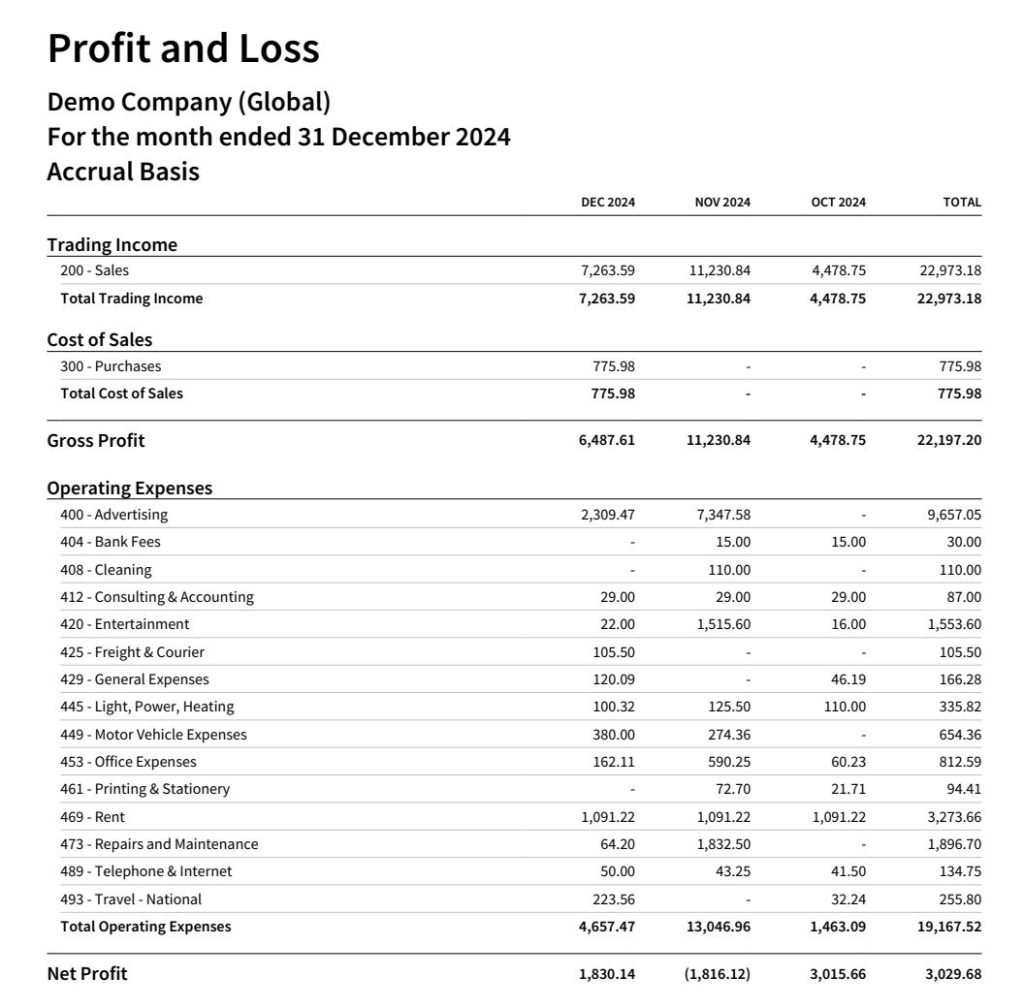
One of the key advantages of Xero Reports is the ability to customize them according to specific business requirements. Users can customize reports in Xero by selecting relevant date ranges, adding or removing data columns, and applying filters to focus on specific aspects of their financial data. This also allows the report to be tailored to specific users. It is unlikely that the owner of the business requires as much in-depth information about the business relative to the Company’s CFO.

Key XERO Reports for Financial Insights
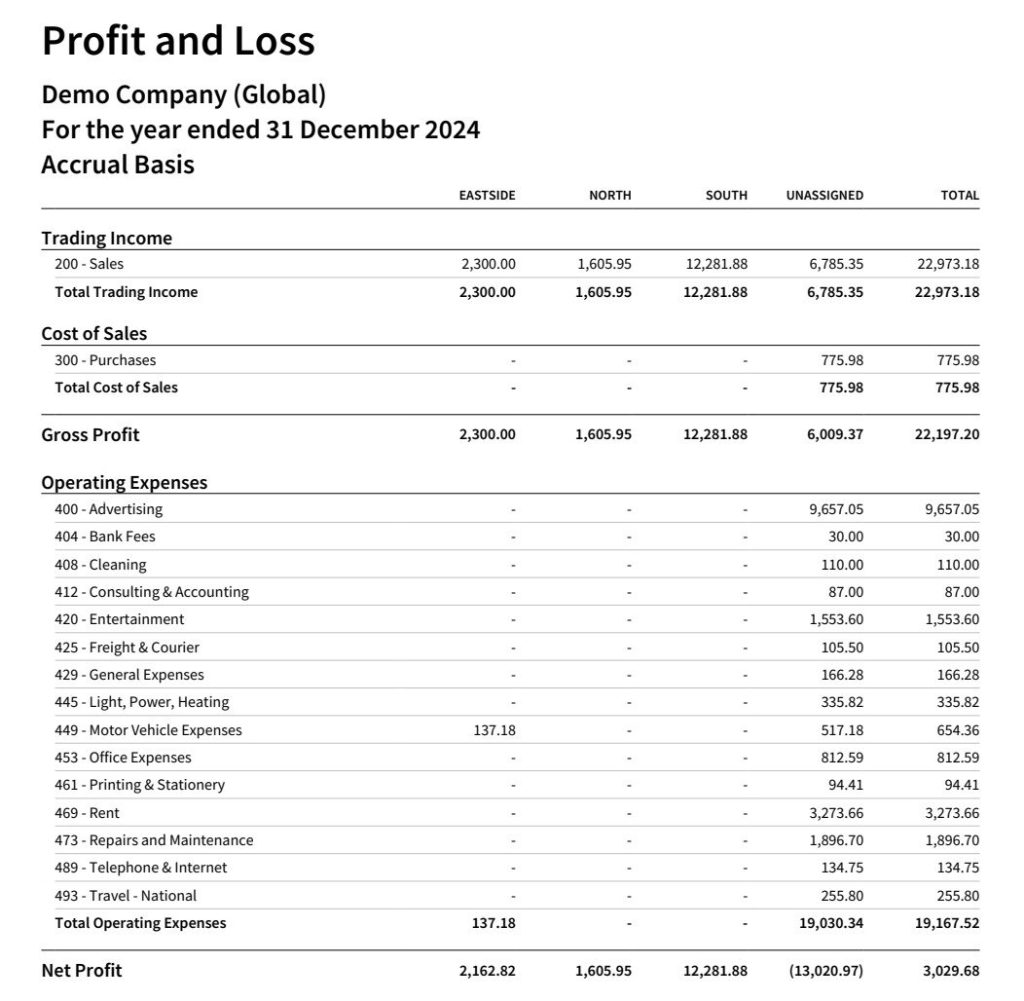
Profit and Loss Reports
Furthermore, you may filter the data across 2 tracking categories. The tracking category is a powerful feature in Xero that allows you to obtain additional insights from your reports. It can be utilized for products, jobs, projects, departments, cost centers, and locations. For example, you can create a tracking category for your project and allocate revenues and expenses to each project to measure project profitability.
Balance Sheet Reports
The Balance Sheet Report in Xero provides a snapshot of a company’s financial position at a specific time. It includes assets, liabilities, and equity, offering a comprehensive view of the company’s financial health.
You can extract the Balance Sheet at a specific point in time and compare it to another date. What is particularly useful is the ability to filter the balance sheet as per the tracking category involved. This allows you to see the number of resources required for a particular business activity.
Statement of Cash Flows – Direct Basis
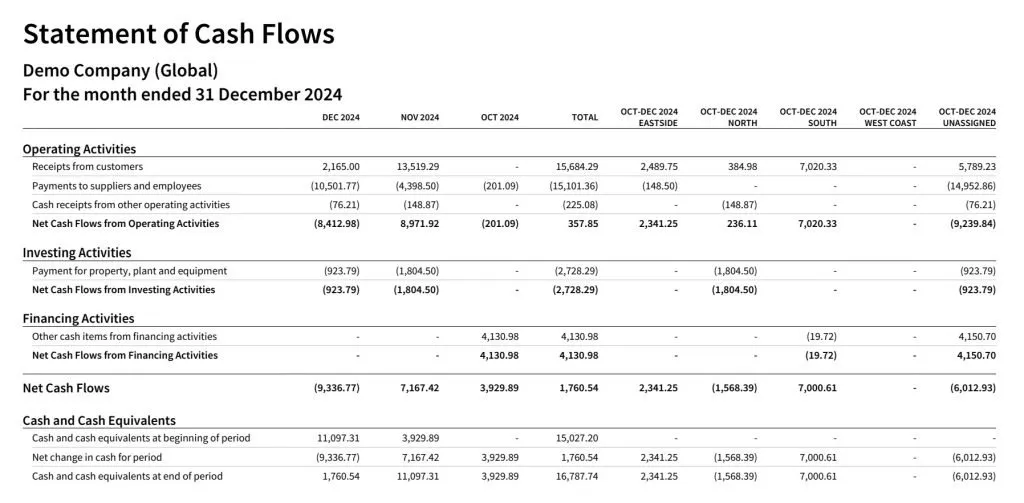
The Cash Flow Report in Xero provides insights into cash movement in and out of the business. It provides the user of the report with critical information on the sources and uses of cash. It highlights which area of your business is generating or consuming a lot of cash. In other words, it helps users track their operating, investing, and financing activities to ensure healthy cash flow management.
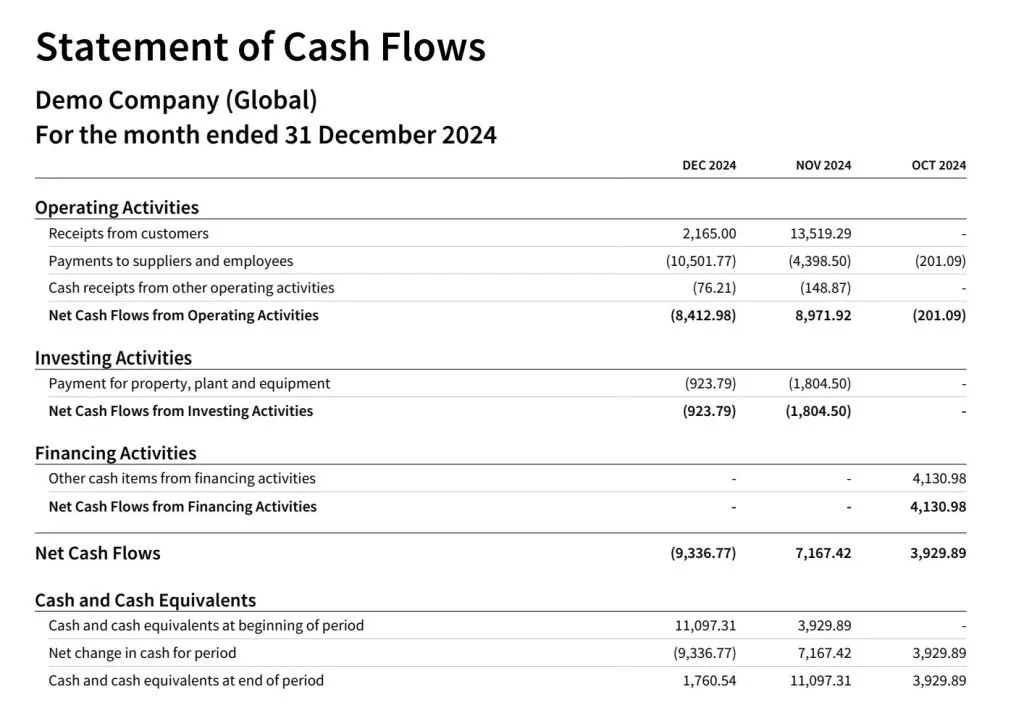
What is useful is that the reader can identify a trend in the company’s operational cash flows on a periodic basis or obtain a breakdown of the cash flows across a tracking category. As we have previously highlighted, operating cash flows are a vital business parameter that deserves close attention.
Accounts Payable & Accounts Receivable Reports
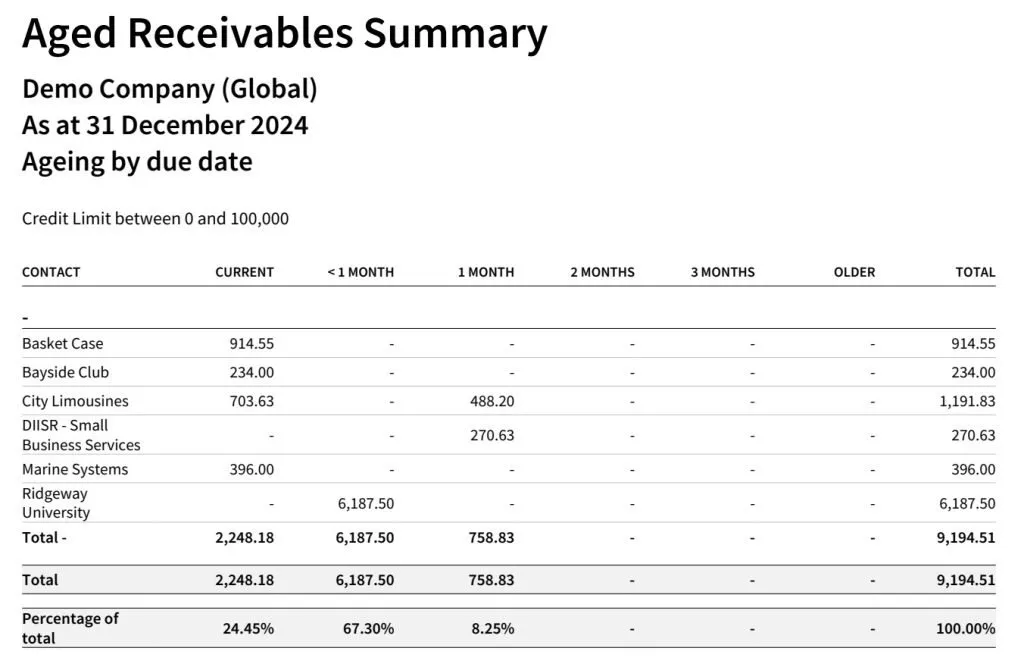
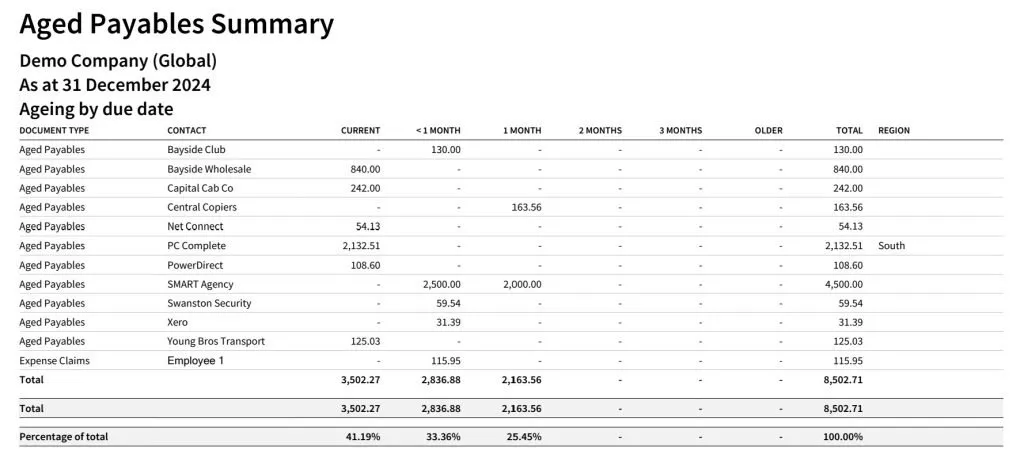
Payable Reports and Receivable Reports provide an overview of your payments from clients and suppliers including outstanding invoices. This helps you keep track of your cash inflows and outflows, maintain timely payments and collections, and reduce discrepancies in financial records.
Depending on the depth of information you need, XERO provides the payables and receivables reports in summary or detailed format. To help you track past-due invoices, the platform offers separate Accounts Payable and Accounts Receivable aging reports dedicated to outstanding invoices.
Budget Variance Reports
Budget Variance Reports compare actual financial performance against the budgeted figures. This report helps users identify discrepancies and take corrective actions to align with the budgeted targets.
To run budget variance reports, you will first need to create a budget. The budget can be directly created in the Budget Manager section or uploaded to Xero. The Budget Manager can also be found under Accounting – Reports. Budgets can be created for the company as a whole or for a specific segment which is defined by a tracking category, such as a department budget or a project budget.
Business Snapshots
Business Snapshot displays your business’s profitability, efficiency, and financial ratios, which are essential to understanding its performance. The data is presented in graphics, illustrating the elements that make up each section, such as comparisons of your expenses and income for profitability insights.
Optimizing Xero Reports for Informed Decision-Making
Key Metrics to Analyze in Xero Reports
When analyzing Xero Reports, certain key metrics can provide valuable insights into a company’s financial performance. These metrics may include gross profit margin, net profit margin, current ratio, and debt-to-equity ratio, among others.
Although these financial metrics can provide useful information, it is best to get advice from an expert to determine which are your company’s critical success factors. Every company is different and what might be relevant for one company might not be that useful for another company.
It is also important to highlight that financial metrics provide insights into the company’s financial success. However, financial metrics are often trailing indicators of financial success. There might be Critical Success Factors that should be tracked but that are not getting tracked inside of your accounting software. They are also called leading indicators.
Using Xero Reports for Business Planning
Xero Reports can be instrumental in business planning by providing the necessary data for forecasting, budgeting, and setting financial goals. Actual figures and historical relations between financial data provide extremely valuable information for financial modelers. By leveraging these reports, businesses can make better strategic decisions that will generate value.
Integrating Xero Reports with Other Financial Tools
Integrating Xero Reports with other financial tools and software, such as budgeting and forecasting applications, can further enhance the analysis and decision-making process. Although Xero reports are extremely powerful, there are also some limitations to them.
Xero Reports are perfect for a small standalone business, but it would be very burdensome to extract lots of data from different entities for consolidation purposes. However, Xero can rely on a powerful ecosystem that allows the financial data to be easily transferred to other software applications when the Company grows, has more advanced reporting requirements or requires additional controls.
Summary
Xero Reports provide powerful and crucial insights on your company’s financial health. By exploring the details of Xero Reports, users can improve their financial knowledge of their business and make better decisions. Users can easily customize reports in Xero to fit their unique requirements.
With the right knowledge and use of Xero Reports, businesses can fully utilize their financial data for informed decision-making and sustainable growth. While Xero has powerful reporting features, your company might require more advanced reporting.
Since Xero’s ecosystem has matured, there exists plenty of software integrations that can extend Xero’s overall capabilities. For most instances, Xero offers a robust accounting platform that the Company can continue to utilize for a very long time.
If you need help with the implementation of your management reports, please feel free to reach out to us. FACFO Pte Ltd. is a Singapore-based Xero-partner firm that is specialized in management accounting and fractional CFO services. We can help you leverage more out of your Xero subscription.